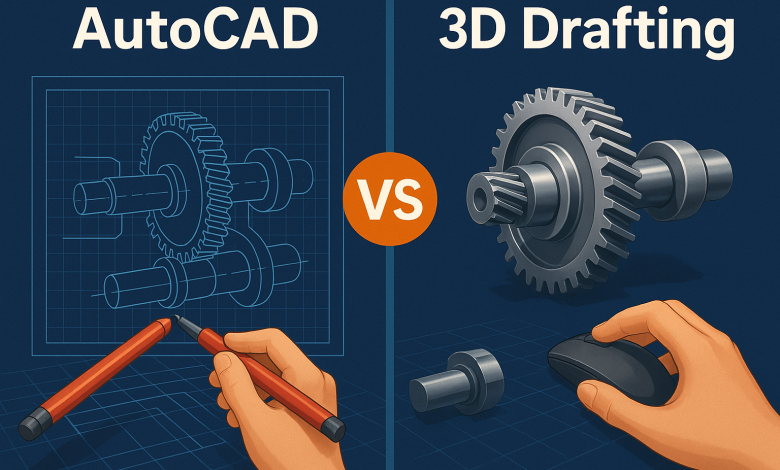
When it comes to modern engineering, one major question continues to shape the direction of product development, manufacturing, and industrial innovation:
Should you rely on traditional AutoCAD drafting or switch to advanced 3D drafting for your mechanical engineering project?
With the rapid rise of automation, digital twins, Industry 4.0, and cloud-enabled collaboration, the choice you make has a direct impact on cost, accuracy, development time, and long-term scalability. For many businesses across the UK and globally this decision is becoming more critical than ever.
Whether you’re an engineer designing complex assemblies, a startup developing prototypes, or a manufacturer optimizing product workflows, understanding the difference between AutoCAD mechanical drawing and 3D drawing mechanical engineering workflows is key.
This guide breaks everything down in a simple, conversational, voice-search-friendly format and helps you decide what best fits your project.
What’s the Real Difference Between AutoCAD and 3D Drafting?
AutoCAD has been an industry-standard for decades. It’s widely used for 2D mechanical CAD drafting services, layouts, schematics, fabrication drawings, and documentation.
But 3D drafting, powered by tools like Autodesk Inventor, SolidWorks, Fusion 360, and CATIA, revolutionizes the design process with lifelike visualization, simulation, and engineering-grade accuracy.
Here’s how the two compare at a fundamental level:
AutoCAD (2D Drafting)
- Best for traditional manufacturing drawings
- Focuses on lines, dimensions, and flat representations
- Ideal for producing fabrication-ready 2D documentation
- Lower software and training requirements
- Limited ability to preview real-world behavior
3D Drafting (Parametric Modelling)
- Creates fully interactive 3D models
- Includes simulation, motion studies, and clash detection
- Great for prototyping, testing, and assembly-level design
- Supports digital twin development
- Reduces errors during fabrication and assembly
Why Do UK Mechanical Engineering Teams Still Rely on AutoCAD?
Despite the push for 3D tools, AutoCAD remains widely used for several reasons.
1. Legacy workflows in UK manufacturing
Many UK factories and workshops still operate with long-standing 2D drawing systems. According to Make UK’s Manufacturing Report 2024, over 40% of small manufacturers still rely primarily on 2D drafting for day-to-day design documentation.
2. Faster documentation for certain projects
If you’re producing:
- P&ID drawings
- Fabrication sheets
- Machine layouts
- Mechanical schematics
AutoCAD offers unmatched simplicity.
3. Lower cost and shorter learning curve
AutoCAD is easier to train teams on especially when working with entry-level drafters.
But is it enough for complex mechanical systems today?
Let’s look deeper.
When Does AutoCAD Fall Short for Mechanical Engineering?
Voice-search queries like “Is AutoCAD enough for mechanical design?” or “Why use 3D drafting instead of AutoCAD?” are becoming more common.
Here’s why AutoCAD alone may not be sufficient:
1. Limited predictive insights
AutoCAD doesn’t simulate:
- Stress
- Motion
- Heat flow
- Tolerances
- Material behavior
For modern products and machinery, simulation reduces risk dramatically.
2. Error risk increases with complexity
Manual adjustments in 2D often lead to:
- Misalignment
- Missing tolerances
- Incorrect dimensioning
- Overlooked interference
A study by Engineering.com found that 3D CAD reduces design errors by up to 50%, significantly improving overall project accuracy.
3. Harder collaboration across global teams
Many UK engineering firms work with:
- International suppliers
- Multi-location manufacturing units
- Offsite design partners
3D cloud tools offer better collaboration, version control, and transparency than flat 2D files.
What Makes 3D Drafting So Valuable for Mechanical Engineering Projects?
3D drafting is not just a trend, it’s transforming mechanical engineering across UK industries, including automotive, aerospace, medical devices, consumer products, and industrial machinery.
Here are the biggest advantages:
1. Better Visualization of Complex Parts
3D drafting gives engineers and clients a complete digital preview, making it easier to understand form, fit, and function.
2. Real-World Simulation
You can test:
- Load-bearing capacity
- Assembly tolerances
- Motion paths
- Fluid or thermal behavior
before the first prototype is manufactured.
3. Faster Prototyping and Fewer Revisions
According to PTC’s CAD Trend Report, companies using 3D CAD systems experience an average 30% reduction in overall design cycles due to early simulation.
4. Reduced Manufacturing Errors
Because 3D models deliver precise instructions, fabricators get:
- Exact tolerances
- Accurate BOMs
- Correct machining parameters
- Clear assembly instructions
This means less rework and fewer production delays.
5. Enables Digital Twins & Industry 4.0 Integration
Many UK companies are now adopting:
- IoT-enabled assets
- Smart factories
- Predictive maintenance systems
3D models are essential for these advanced workflows.
Which Is More Cost-Effective AutoCAD or 3D Drafting?
Cost is one of the biggest deciding factors for businesses when choosing between the two.
Here’s a simple breakdown:
AutoCAD Cost Benefits
- Lower subscription
- Less training required
- Faster adoption
- Suitable for short-term or simple projects
3D Drafting Cost Benefits
- Reduces prototyping costs
- Minimizes mistakes during production
- Shortens design cycles
- Enables more innovation and future scaling
In many cases, 3D drafting saves money over the entire project lifecycle even if the initial investment is higher.
Which Is Best for Different Types of Mechanical Engineering Projects?
To make it easier, here’s a quick comparison that decision-makers often look for:
AutoCAD Is Best For:
✔ 2D fabrication drawings
✔ Machine layouts
✔ Legacy system requirements
✔ Simple metal or sheet components
✔ Quick mechanical sketches
3D Drafting Is Best For:
✔ Complex mechanical assemblies
✔ High-precision products
✔ Prototypes and testing
✔ Motion-based components
✔ Industrial machinery design
✔ 3D drawing mechanical engineering applications
✔ Long-term product development
Most modern engineering firms use a hybrid workflow 3D modelling for design, AutoCAD for final production documentation.
So, What’s Best for Your Mechanical Engineering Project?
If your project involves simple parts or legacy workflows, AutoCAD mechanical drawing may be enough.
But if your work demands innovation, precision, and reduced risk, investing in mechanical CAD drafting services powered by 3D tools delivers significantly better outcomes.
With global competition rising and UK engineering shifting toward automation and Industry 4.0, 3D drafting offers a long-term advantage no business should ignore.
What Should You Look for When Hiring Mechanical Design and Drafting Services?
When outsourcing or partnering with a CAD company, ensure they offer:
- Experience with both AutoCAD and 3D modelling platforms
- Knowledge of UK engineering standards
- Strong mechanical engineering expertise
- Simulation and analysis capabilities
- Fast turnaround times
- Proven portfolio of industrial and manufacturing projects
A balanced mix of 2D and 3D expertise ensures accuracy, innovation, and long-term mechanical performance.
Final Thoughts:
The debate between AutoCAD vs 3D drafting isn’t about replacing one with the other, it’s about choosing what best supports your project’s technical needs, budget, and long-term goals.
- AutoCAD offers simplicity and reliability.
- 3D drafting offers intelligence, accuracy, and competitive advantage.
If you want a well-rounded approach tailored to modern engineering demands, partnering with an experienced UK-based CAD design team can make all the difference. Many leading companies now rely on specialized mechanical design and drafting services to improve efficiency, reduce costs, and accelerate product development cycles.
Keep an eye for more latest news & updates on Visit Blog!